
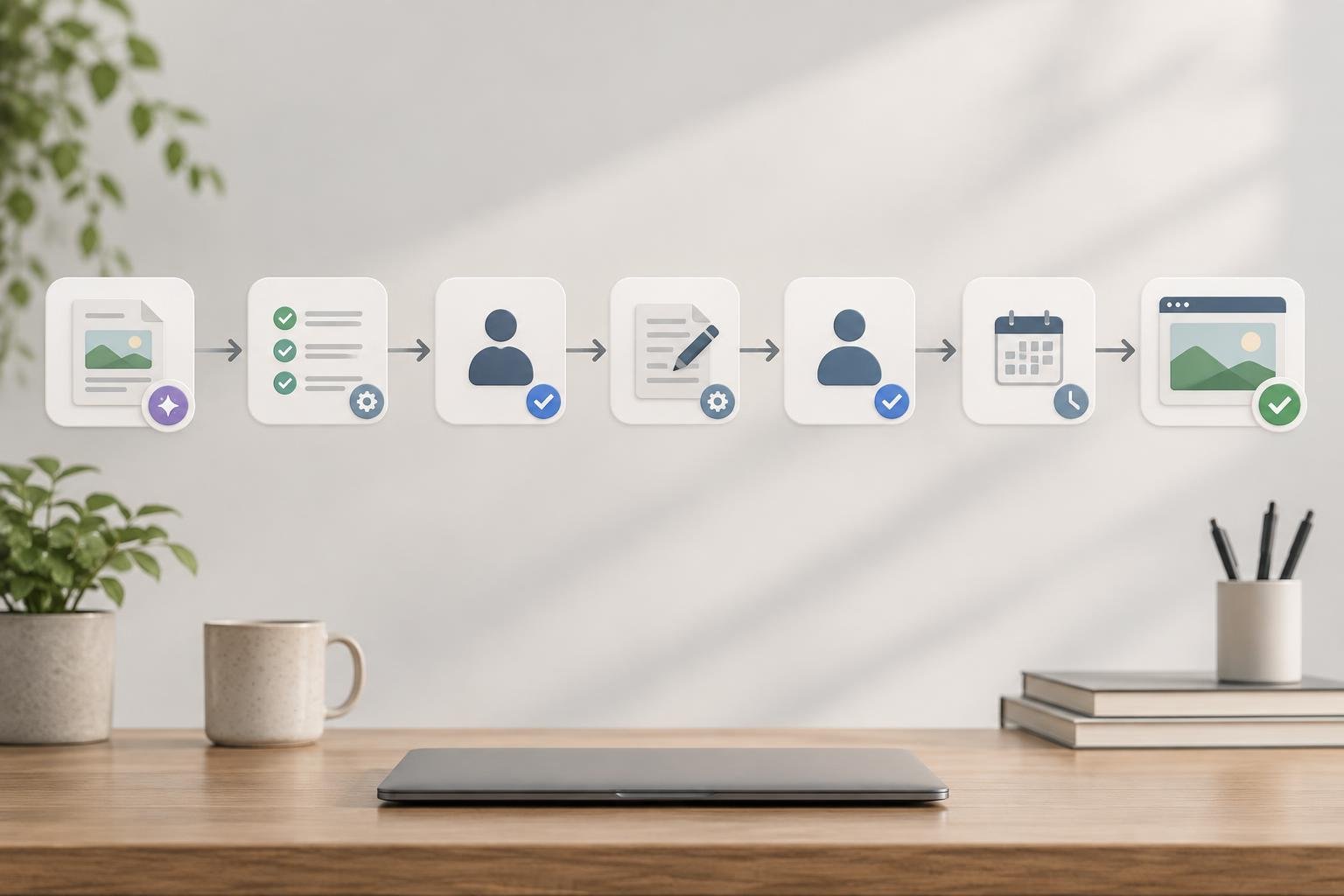
An automated blog review workflow connects generated drafts to human approval, scheduled publishing, and live-page checks. Automation handles routing and handoffs; people judge accuracy and usefulness. Each draft needs an owner, a clear status, and an approved version. This guide covers the seven steps, release controls, and failure checks that connect them.
Key takeaways
- Route every draft with its website, reviewer, and review deadline attached.
- Use automated checks to flag problems, never to grant editorial approval.
- Tie approval to a specific draft version and destination.
- Verify the live page before marking publication complete.
On this page
- How does an automated blog review workflow move a draft live?
- Step 1: Route each generated draft into a review queue
- Step 2: Run automated checks before human review
- Step 3: Give the human reviewer a focused checklist
- Step 4: Return revisions without losing the latest version
- Step 5: Record approval before releasing the draft
- Step 6: Schedule the approved post in the right CMS
- Step 7: Verify the live page and route publishing failures
- Trade-offs: Where automation should stop
How does an automated blog review workflow move a draft live?
Generation creates the draft, and automated checks flag issues. A human reviews the content, revisions resolve blockers, and approval releases a specific version for the intended website. Scheduling queues that approved version, while live-page checks confirm publication and route any failures to an accountable owner.
Postrex supports article generation, manual review options, scheduling, and CMS integrations through automated blog publishing. The controls below describe a recommended setup. Routing rules, approval records, and version safeguards may need external tools.
Planning a WordPress setup? Explore WordPress publishing to assess the platform-specific path before building custom handoffs.
Generated draft
    -> Automated checks
    -> Human review
    -> Revisions resolved
    -> Version approval
    -> Scheduled publication
    -> Live-page verification
Assign responsibility before connecting tools:
| Stage | Owner | Exit condition | Next action |
|---|---|---|---|
| Generation | Content operator | Review packet complete | Run checks |
| Automated checks | Workflow operator | Mechanical blockers cleared | Notify reviewer |
| Human review | Editor | Feedback or approval decision recorded | Resolve revisions |
| Revisions | Assigned writer | Requested fixes complete | Return for review |
| Approval | Named approver | Version and destination approved | Release to scheduler |
| Scheduling | Publishing operator | CMS accepts intended schedule | Monitor publication |
| Verification | Publishing operator | Live page passes checks | Close task or route failure |
Review automation coordinates work. The editor still owns the decision to publish, even when software moves every task between stages.
Step 1: Route each generated draft into a review queue
Send each generated draft to one shared review queue. Attach the destination website and named reviewer before asking anyone to assess the content or make changes. Keep status updates in that queue so editors can see what needs attention without searching email threads or chat messages.
Give every draft an owner and destination
A small team can assign one reviewer to its queue. Multi-site publishers should route drafts by website, subject expertise, or both. Keep a shared overview, with a separate view for each site's work.
WordPress's Post Status documentation lists 8 built-in statuses. These include pending for posts awaiting publication by someone with the publish_posts capability. Use CMS status where helpful, but define who owns the editorial task separately.
Verify which routing features your selected tools support. If automatic assignment is unavailable, make assignment a required intake action.
Attach the context reviewers need
Use this minimum intake checklist:
- Article ID and target website.
- Target keyword and intended audience.
- Canonical draft URL.
- Proposed publication date.
- Assigned reviewer and review deadline.
Topic selection and brand voice belong upstream. Attach the existing brief and voice guidance rather than asking reviewers to reconstruct them.
For example, a Shopify store's buying guide needs the correct store destination and current product context. A reviewer should never infer either from the article title.
Step 2: Run automated checks before human review
Run mechanical checks before an editor opens the draft. These checks should catch missing fields and broken publishing elements while leaving factual claims and suitability to human judgment. Define which failures block review and which warnings simply need attention, then record the results beside the draft.
Separate blockers from advisory warnings
Configure checks where your tools support them:
- Required fields contain valid values.
- Headings follow the intended structure without an extra H1.
- Links resolve to the intended destinations.
- Internal links point to the correct website.
- Images meet your requirements, including alternative text.
- CMS previews preserve lists, tables, and formatting.
These are workflow recommendations, not claims about native Postrex checks. Confirm what each tool tests before relying on its result.
Treat a wrong destination as a blocker. Flag a stylistic heading preference as a warning. Manual confirmation may be necessary when a website blocks automated link testing.
For link-planning details, use the guide to automated internal linking. Keep this queue focused on whether each planned link works and belongs.
Keep factual judgment out of pass-or-fail scoring
A blog post grader can serve as a review aid after you verify its checks. Its score must never change a draft's state to approved.
Software can detect an empty source field. An editor must decide whether that source actually supports the claim. Apply the same human judgment to originality and brand suitability.
Step 3: Give the human reviewer a focused checklist
Give the reviewer a short checklist and explicit authority. The accountable approver must check accuracy, usefulness, and product fit before releasing a draft for its intended audience. Set a review deadline at assignment, and name a backup who can handle delays without weakening the approval standard.
Review claims, usefulness, and product accuracy
Google Search Central states in its guidance on generative AI content: "It is critical to manually factcheck and review all AI-generated content for accuracy and trustworthiness before publishing."
Google Search Central also extends accuracy review to 4 metadata types: title elements, meta descriptions, structured data, and image alternative text. Include these fields in the review packet.
Use this reusable approval checklist:
- Intent: Does the opening answer the reader's question?
- Claims: Do sources support the wording and scope?
- Products: Do features and limitations match the actual offering?
- Voice: Does the draft follow the brand's guidance?
- Usefulness: Can the reader act on the advice?
- Links: Does each destination support the surrounding text?
- CTA: Does the next step fit the reader's intent?
- Metadata: Do search and image fields describe the content accurately?
Use the brand voice review workflow for detailed voice checks. Avoid rebuilding that process inside every approval task.
Escalate content that needs subject expertise
Send sensitive or unfamiliar claims to a qualified subject reviewer. A copy editor should not approve a medical claim solely because it reads clearly.
For ecommerce content, escalate uncertain compatibility claims to the product owner. Keep the draft blocked until someone resolves the uncertainty or removes the claim.
Step 4: Return revisions without losing the latest version
Return requested changes through the same canonical draft record. Consolidate feedback into an assigned revision task, then send the updated version back through the checks affected by those edits. Keep a version identifier visible so reviewers can tell which text they assessed and which changes still need attention.
Consolidate feedback into one revision request
Use a repeatable revision loop:
- Consolidate reviewer feedback into one request.
- Assign the revision to a named writer or operator.
- Update the canonical draft and its version identifier.
- Rerun checks affected by the changes.
- Return the revised draft to the accountable reviewer.
Structure each comment around location, problem, and acceptance condition. For example: the compatibility paragraph names an unsupported product; replace it using the current product record.
Avoid parallel editing. Assign one active revision owner, and ask other reviewers to leave comments rather than overwrite text.
Recheck the parts that changed
WordPress.com's revision guidance says its editor saves changes locally every 15 seconds and online about once per minute. Those saves help preserve work; they do not record an editorial approval decision.
Version history and comparison features depend on your tools. If comparison support is missing, attach a change summary to the revision task.
Review changed passages and their effects on the rest of the article. A changed product claim may also require a new introduction or meta description. Avoid rereading unchanged sections unless the edit changes their meaning.
Step 5: Record approval before releasing the draft
Record approval as an explicit decision about a version. Include the approver, timestamp, destination website, and draft identifier before any automation sends content to the publishing queue. Material edits must return the draft to review because the earlier approval no longer covers the text awaiting publication.
Approve a version, not just an article
Store the approved version alongside its review record. A document link alone is insufficient when someone can keep changing the document behind it.
Use a simple transition policy:
| Current state | Allowed next state | Required condition |
|---|---|---|
| In review | Changes requested | Reviewer records actionable feedback |
| In review | Approved | Approver records version and destination |
| Changes requested | In review | Revision owner submits updated version |
| Approved | Scheduled | Scheduler confirms matching version |
| Approved | In review | Material edit invalidates approval |
| Scheduled | In review | Operator pauses publication before revision |
Define material edits before disputes arise. Changes to claims, product advice, or the destination website should require renewed approval.
Keep unapproved drafts out of the publishing queue
Check approval at the release boundary. The scheduler should accept only the version named in the approval record.
External automation can coordinate handoffs through supported webhook events or API actions. Check the current webhook integration documentation for available events, and verify action permissions before connecting systems.
Do not assume Postrex supplies native approval locks, audit logs, or custom state transitions. If your setup lacks an enforceable gate, retain a manual release step.
Step 6: Schedule the approved post in the right CMS
Schedule only the approved version in its intended CMS. Confirm the website, publishing fields, and time zone before submitting the post, then retain the CMS identifier with the workflow record. Set a cutoff for late approvals so missed slots move forward without creating pressure to bypass review.
Check destination, timing, and publishing fields
Before scheduling, confirm:
- Destination website and blog.
- Publication date and time zone.
- Author and category.
- Slug and featured image.
- SEO metadata.
- Intended publish status.
- Approved version identifier.
The WordPress REST API Posts reference lists 5 status values: publish, future, draft, pending, and private. WordPress also provides publication-date fields in the site's time zone and GMT. Verify the mapping your integration uses.
Postrex offers WordPress integrations and Shopify blog publishing. For store operators, confirm the correct store and blog before every release.
Choose the handoff based on actual capabilities:
| Publishing path | Best fit | Operational trade-off |
|---|---|---|
| Direct CMS integration | Supported website platform | Confirm available field mappings and statuses |
| API or webhook handoff | Custom workflow needs | Maintain permissions, mappings, and failure handling |
| RSS or export handoff | Import-based workflows | Confirm whether import preserves scheduling and metadata |
An export or feed does not inherently provide the same controls as direct publishing. Test the full path with a nonpublic draft.
Handle late approvals without skipping review
Move overdue drafts to the next available slot. Notify the queue owner and retain the original review requirements.
Attach a stable identifier combining the website and article record. Store the returned CMS post ID so retries can find the existing post rather than create duplicates.
Step 7: Verify the live page and route publishing failures
Verify the public page before marking the workflow complete. A successful CMS response confirms that the system accepted a request, but it does not prove every field reached the page. Check the rendered result against the approved version, and assign any failure to an owner before retrying publication.
Confirm the published page matches the approved draft
Use a live-page checklist:
- Open the expected live URL without an editor login.
- Confirm the HTTP response and intended public access.
- Compare rendered content with the approved draft.
- Test links and inspect images.
- Check the canonical URL points to the intended page.
- Confirm intended indexability and crawler access.
- Inspect the live title, description, and other required SEO metadata.
The guide to WordPress SEO metadata failures covers a specific failure mode: content creation can succeed while metadata writes fail. Check the live fields separately.
Google Search Central's technical requirements list 3 minimum conditions for indexing eligibility: Googlebot access, an HTTP 200 response, and indexable content. Google explicitly says meeting these requirements does not guarantee indexing. Publication also cannot guarantee rankings.
Alert an owner before retrying a failed handoff
Send failure alerts with the article ID, website, failed check, and CMS post ID. Name the person responsible for recovery.
Check whether the post already exists before retrying. Use a finite retry limit, then stop and escalate if the handoff still fails.
Correct minor field errors and rerun verification. For harmful claims or a wrong-site publication, pause distribution and have the authorized owner correct or unpublish the page.
Trade-offs: Where automation should stop
Keep human judgment at the points where errors matter. Automate predictable transfers and checks, but retain manual review when a claim could mislead customers or requires expertise your editor lacks. Expand the queue only when reviewers can clear it reliably, rather than treating generation speed as permission to publish.
Keep sensitive or unfamiliar claims under closer review
Deeper review takes more time. A single approver simplifies ownership, while specialist escalation adds expertise and another dependency. Direct integrations reduce custom maintenance; flexible handoffs require someone to own the plumbing.
Use explicit decision rules:
| Situation | Decision | Release condition |
|---|---|---|
| Familiar, low-risk topic | Retain standard manual review | Named approver clears checklist |
| Sensitive or unfamiliar claim | Require specialist review | Qualified reviewer resolves uncertainty |
| Stale approval or changed claims | Pause scheduling | Approver clears the current version |
| Wrong destination or unresolved failure | Pause publishing | Owner fixes and verifies the problem |
Consider an operator managing a homeware store and a supplement store. Both can share routing infrastructure. The supplement article's health claims still need closer review; the homeware editor's availability cannot replace relevant expertise.
Scale the queue only as fast as reviewers can clear it
Track queue age by website and reviewer. If drafts keep waiting, reduce intake or assign qualified backup coverage before increasing generation.
A high score cannot resolve an approval bottleneck. Neither can an old approval cover newly changed copy.
To test the workflow, record review time, human handoffs, revision cycles, and publishing failures for comparable posts. Use those observations to adjust routing. Do not assume more posts create SEO gains; the guide to AI blog automation and SEO addresses that broader question.
The bottom line A reliable workflow releases an approved version to the correct website and verifies the live result. Trace one draft through the full path before expanding the queue, checking ownership and exit conditions at every handoff.
Frequently asked questions
How long should a blog post stay in the review queue?
A blog post should stay in review until its assigned approver resolves all publication blockers, within a deadline set at intake. Choose that deadline around content risk and reviewer capacity. If review misses the scheduling cutoff, move the post to the next available slot rather than bypass approval.
Can one person write, review, and approve blog posts?
One person can write, review, and approve routine blog posts if the workflow keeps those tasks distinct. Finish the draft, run checks, then review it against a written checklist before recording approval. For sensitive claims or unfamiliar subjects, bring in a qualified reviewer instead of relying on self-review.
How should a team handle urgent edits after publication?
Assign urgent live edits to an authorized owner who can correct or unpublish the page based on the risk. Save the current version and document the issue. Review the correction, update the canonical draft, and verify the live page again. Pause related distribution while a harmful error remains unresolved.
What is the difference between editorial approval and CMS publishing permission?
Editorial approval confirms that a named person accepts a specific content version for publication. CMS publishing permission gives an account the technical ability to publish. A team member may have that permission without authority to approve claims. Keep both controls explicit, and require recorded approval before the publishing account releases content.
Which metrics show whether a blog review workflow is improving?
Track queue age, review time, human handoffs, revision cycles, and publishing failures to assess workflow improvement. Compare similar content types and separate results by website or reviewer where useful. Faster publication alone is insufficient: check whether corrections, duplicate posts, or missed review steps increase as turnaround time falls.